
Find out why an operator may ask for your passport details or a copy of your passport, and how to share them securely.
It's normal for a tour operator to ask for your passport details, and sometimes a copy of your passport, after you book. Operators use them to arrange parts of your tour, and in some places a booking can't be secured without them.
Why does the operator need my passport details?
Some permits, activities and hotels need your passport details before the operator can confirm your place. For example, operators need a copy of your passport to secure permits for the Inca Trail in Peru. Some hotels and activities also ask for passport details, depending on the location.
How do I add my passport details?
You can enter your passport details for each traveler on the Travelers tab of your Booking Conversation Page.
-
Log in to your TourRadar account.
-
Open your account menu and select Bookings.
-
Select your booking. This opens your Booking Conversation Page.
-
Select the Travelers tab and add the passport details for each traveler.
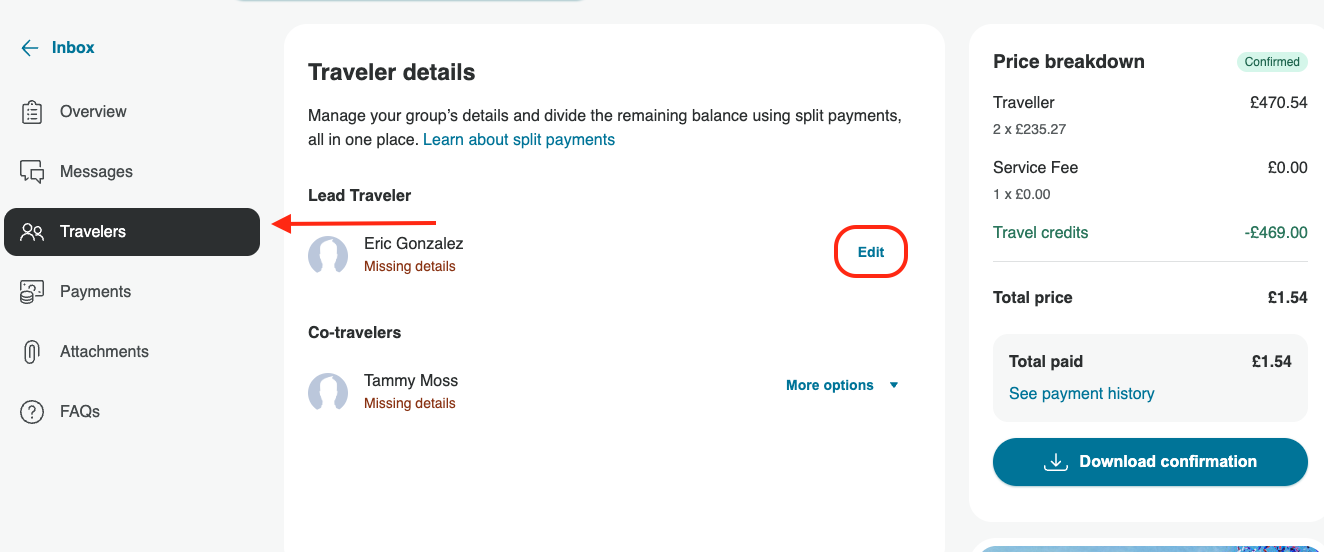
Find out more in How do I update traveler's details on my Booking Conversation Page?.
How do I send the operator a copy of my passport?
If the operator asks for a copy of your passport, upload it on the Attachments tab of your Booking Conversation Page. To keep your passport secure, always share it this way. Files you upload there are only available to the operator and the TourRadar staff involved in organizing your tour.
Once you've uploaded it, send the operator a message on the Messages tab to let them know, so they can find it. For step-by-step help, see How do I attach or upload a document?.
How do I know if a request for my passport is genuine?
Most requests for passport details are genuine and come from your operator through your Booking Conversation Page. Be cautious if a request asks you to send your passport somewhere else, asks for payment or card details at the same time, or pressures you to reply urgently.
If you're not sure a request is genuine, don't share anything yet. Send us a message on your Booking Conversation Page and our Customer Support team can check it for you. Find out more in How to identify and report suspicious messages.
Related questions
-
How do I update traveler's details on my Booking Conversation Page?
-
What is the Booking Conversation Page, and how do I find it?
Still need help? Our Customer Support team is here 24/7. Contact us.