
If you're having difficulty logging in, creating an account, resetting your password, or accessing your booking, you'll find the most common causes and solutions below.
How do I log in or create an account?
For full instructions on logging in or creating an account, including how to use a One-Time Verification Code for temporary access to your Booking Conversation Page, see: How to Log In or Sign Up for an Account
I didn't receive the email or code to reset my password
There are two common reasons a password reset email doesn't arrive:
-
You signed up with Google, Apple or Facebook: no password reset email is sent for these accounts. Log in with the same option you used when you signed up.
-
The email address isn't the one linked to your account: if you use more than one email address, try the other one.
If you did sign up with an email and password and the email still hasn't arrived:
-
Enter your email address in all lowercase letters.
-
Wait a few minutes, then check your spam or junk folder.
-
If you requested more than one code, use the code from the most recent email.
My password reset code is not working
When you reset your password, you'll receive a 6-digit reset code by email. Enter this code on the "Reset Password" screen before setting your new password.

Reset codes are valid for 20 minutes. If your code has expired, request a new one.
-
If you requested multiple reset emails, only the most recent code will work. Please make sure you're entering the code from the latest email.
-
Some email providers group multiple reset emails into a single thread. If this happens, scroll to the most recent message and use the newest code shown.
I don't remember how I signed up
Go to tourradar.com and open the login page. The option you used last time is marked Last used, so you can choose the same one again.
If you've just tried to log in and seen an error message, go back to tourradar.com and open the login page again to see the Last used label.
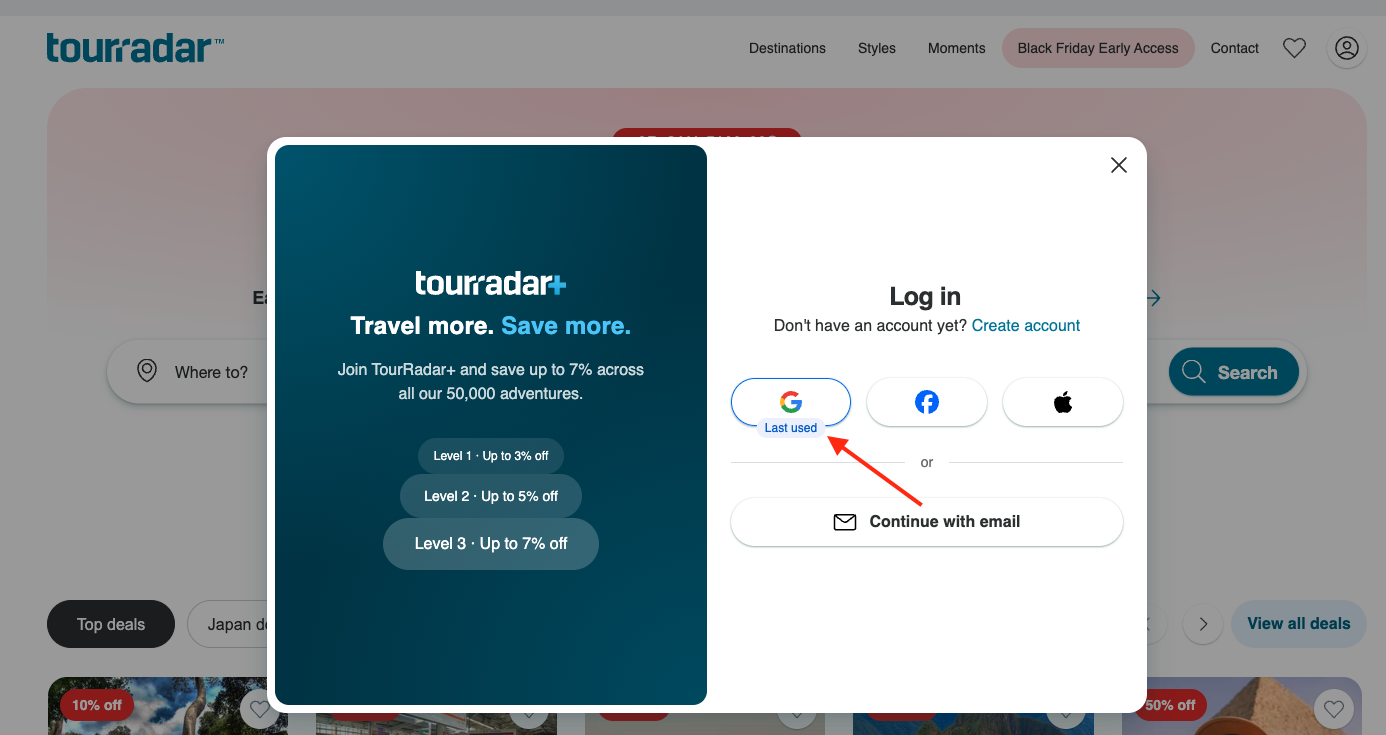
If you signed up with Google, Apple or Facebook, log in with that same option each time, and choose the same Google, Apple or Facebook account you used to sign up. Password reset emails aren't sent for these accounts.
I get an error message when trying to log in
If you see an error message when trying to log in, here's what it means and how to fix it:
Error - "Incorrect username or password"
Make sure you're using the email address linked to your TourRadar account.
-
If you don't remember your password, use the "I forgot my password" option to reset it.
-
If you originally signed up with Google, Apple, or Facebook, you'll need to log in with that method instead.
Error - "Pre-Authentication failed: Your password must be reset"
This means your password doesn't meet our new security requirements.
-
Use the "Forgot your password?" option to reset it.
-
For full instructions see: How to Reset Your TourRadar Password.
Error - Invalid Input: Could not reset password
This means your email address has not been verified, or the password reset flow was interrupted. Contact our team for further support.
I don't know if I have a TourRadar account
-
If you've made a booking with us (or signed up previously), you already have an account.
-
An account is automatically created using the email address provided at the time of booking.
-
An email is sent to complete your account setup. If you can't find the verification email, or the link has expired, you can reset your password at any time by selecting "Forgot your password?" on the login page.
I'm logged in but I can't see my booking
-
Your booking only shows in the account for the email address used to make the booking. If you use more than one email address, log out and log in with the one that received your booking confirmation.
-
If someone else booked the tour for you, the booking shows in their account, not yours. This applies even if you're traveling together and made a payment: if the booking wasn't made under your email address, you won't be able to see it in your account.
-
If you're logged in with the right email address and your booking still doesn't show, our Customer Support team can help.
Related questions
Still need help? Our Customer Support team is here 24/7. Contact us.