
The Marketing Page Creator is a free tool available in your partner portal that lets you build professional, on-brand marketing pages for the tours you sell — no design skills, no cost, and no waiting on anyone else to make it for you.
Just describe the page you want in plain language — for example, "Best Japan tours for solo travellers under USD 3,000" — and the tool generates a complete, publishable page featuring relevant tours, your own branding, and your contact details.
You can then share that page with clients by email, on social media, or on your own website. Clients can browse the page and reach out to you directly, or book right there on the page — and either way, you stay the agent of record and keep your commission. Direct bookings don't cut you out; they just save you a step.
Why use it?
-
Look professional instantly. Get a polished, branded page in minutes — no designer required.
-
Stay the point of contact. Every page carries your branding and contact details, so clients know to come to you.
-
Keep your commission. Even when a client books directly through the page, you still manage the booking and earn commission as usual.
How to create a page
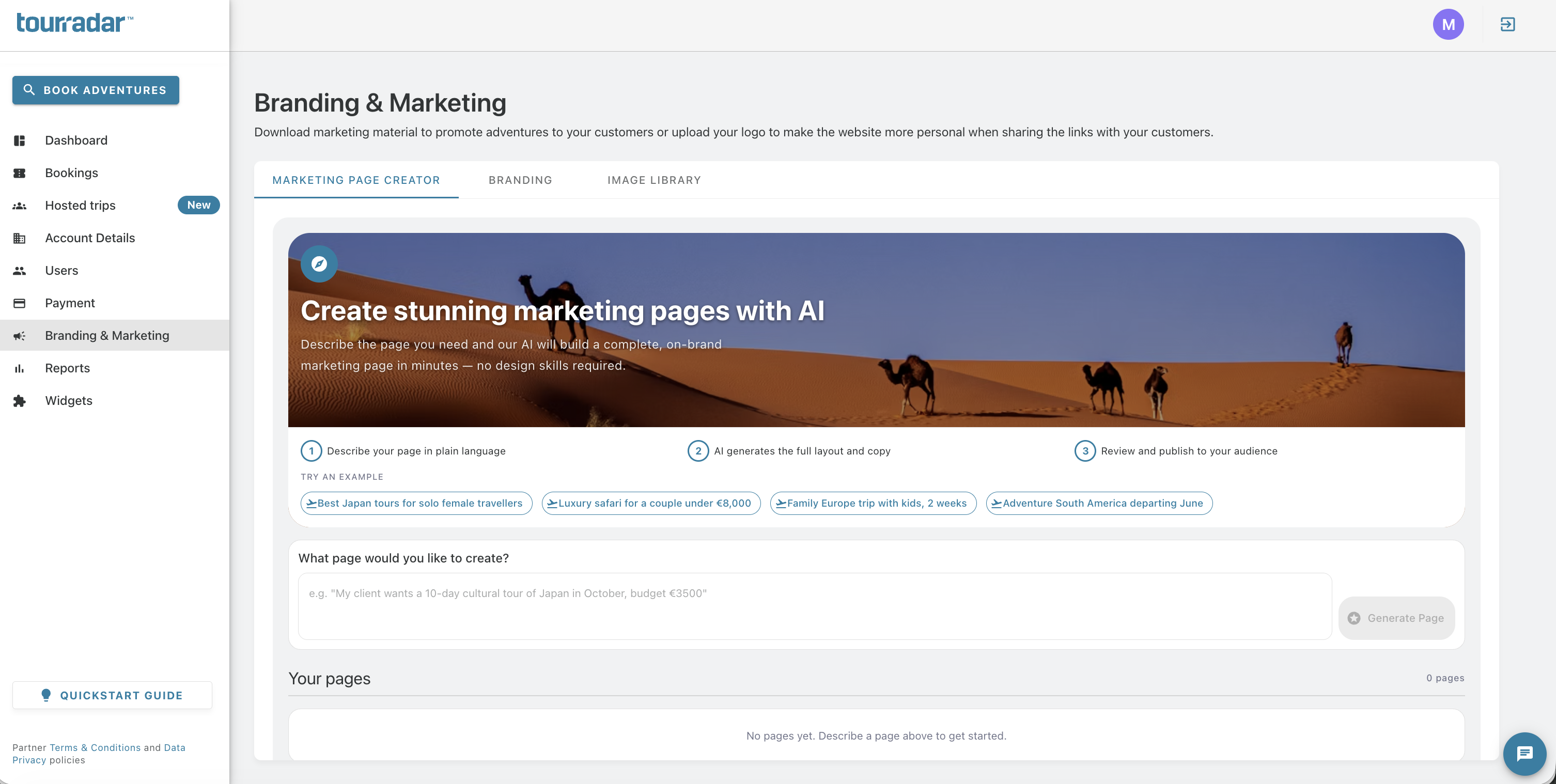
Log in to the partner portal and open the Marketing Page Creator under the “Branding & Marketing” tab.
-
Describe the page you want in plain language. Be as specific as you like about destination, trip type, audience, budget, or theme — for example:
-
Adventure tours in Peru for couples
-
Family-friendly Italy tours under USD 5,000
-
Best small-group safaris in Tanzania
-
-
Review the generated page. The tool will pull in relevant tours and lay out a complete page for you to check over.
-
Confirm your branding and contact details are correct, so clients know how to reach you.
-
Publish the page.
Sharing your page
Once published, you can share your page:
-
By email — send the link directly to clients or your mailing list.
-
On social media — post the link to promote it to your followers.
-
On your own website — embed or link to the page from your own site.
What happens when a client visits your page
Clients who open your page can:
-
Browse the tours featured on it, and
-
Contact you directly to book, or
-
Book the tour themselves right from the page.
In every case, you remain the agent on the booking and earn your commission — the page is designed to generate leads and bookings for you, not replace you.
Frequently asked questions
-
Does it cost anything to use? No. The Marketing Page Creator is free to use in the partner portal.
-
Do I need any design experience? No. You describe the page in plain language and the tool handles the layout and design for you.
-
If a client books directly through my page, do I still get commission? Yes. You remain the managing agent on any booking made through your page, and you earn commission as normal.
-
Can I create more than one page? Yes. You can create as many pages as you like for different destinations, trip types, or client segments.