
You can easily apply an eligible promo code when booking a tour on TourRadar.
Here's how it works:
-
Go to the Booking page of the tour you'd like to book by selecting your preferred date.
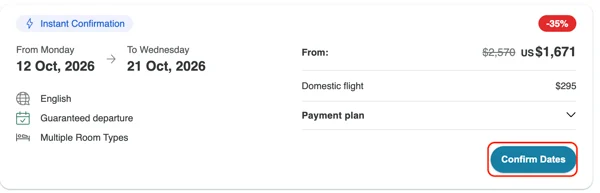
-
Scroll to the TourRadar Savings section.
-
Click Redeem Promo Code.
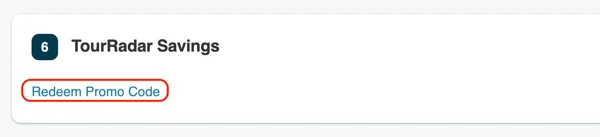
-
Enter your code and select Apply.
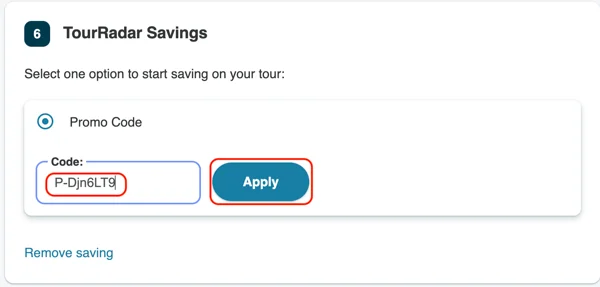
-
The promo code savings will appear in your booking summary.
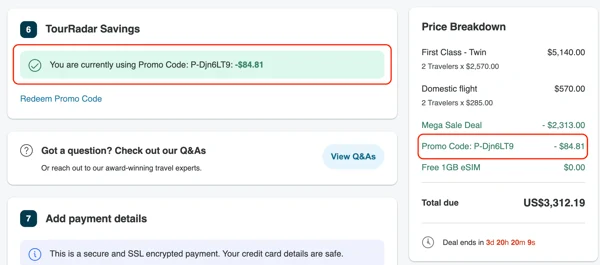
Important to know
Promo codes must be applied before you complete your booking, as they can't be added once the booking request has been submitted.
However, there are a couple of situations where we may still be able to apply your promo code after booking, although this is not a guarantee:
-
Within one hour of booking: If only your deposit or initial payment has been processed, contact us within the first hour and we may be able to help.
-
Technical issues: If the code didn't apply due to a technical problem, reach out to our support team immediately.
Promo codes cannot be combined with TourRadar+ Member Savings - choose whichever gives you the better deal.
Having trouble applying your promo code?
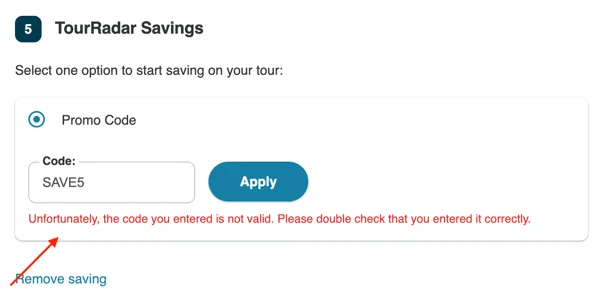
If you see this error message when entering a promo code it usually means the code was entered incorrectly, has expired, has already been used, or isn't a valid TourRadar promo code (e.g. from a third-party coupon site). Some codes are single-use, so they won't work again if already applied to a previous booking.
If you believe the code is still valid, contact our team via Live Chat. We're here 24/7 and happy to help—but we can only assist with valid promo codes.