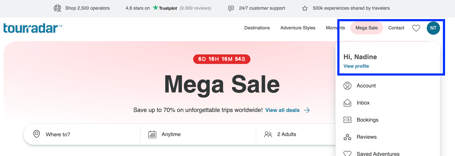
What is a Shareable Profile?
Your Shareable Profile is a public TourRadar page that showcases your travel credibility in one place:
- Moments — short videos and photos from your real trips
- Places you've been — every country you've explored
- Verified reviews — honest feedback from tours you've completed
- Social links — Instagram, TikTok, YouTube, website
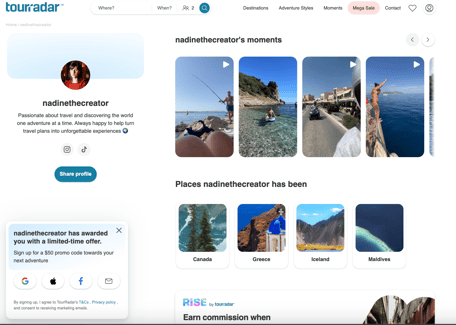
Once complete, your profile generates a short, public link: tr.tours/{your-handle} — short enough to say on camera, drop in a caption, or add to your bio.
How is this different from a promo code?
| Promo code | Shareable Profile | |
|---|---|---|
| How it works | Customer must remember and enter code at checkout | Anyone who clicks your link first and books within 90 days earns you commission automatically |
| Lost commission risk | Yes — if the customer forgets | No — attribution is automatic on first click |
| Audience offer | $50 off at checkout | $50 personalised sign-up offer shown automatically to new visitors |
| Promo code required | Yes | No |
How to activate your Shareable Profile
Complete these three steps in your account:
- Choose a username — this sets your public link: tr.tours/yourhandle
- Write a short bio — a sentence or two about you and your travel style
- Add at least one social media link
Once all three are done, your profile is shareable. You'll find your unique link in your account under your profile settings.
How attribution works
- 90-day first-click window: any visitor who clicks your profile link and books within 90 days is attributed to you
- No promo code needed: commission is tracked automatically via your profile link
- All your links count: you can earn by sharing any TourRadar link - individual tours, any page from TourRadar, or simply your profile link
You can track all attributed sessions and earnings in the RISE partner portal.
The $50 offer for your audience
When a first-time TourRadar visitor arrives via your profile link, they're automatically shown a personalised sign-up modal that:
- Credits you by name
- Offers $50 off their first TourRadar booking
- Requires no setup from you — it triggers automatically
If the visitor already has a TourRadar account but hasn't used their $50 discount yet, it will be applied at checkout automatically.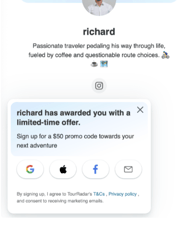
What happens to my existing promo code?
- Your promo code continues to work for customers to get $50 off at checkout until 23 April 2026
- After 23 April, the promo code will no longer generate commission for you and will be removed from your dashboard
- Your past earnings history remains accessible in the partner portal
Frequently asked questions
Does the profile link work if the customer doesn't use a promo code? Yes. Attribution is entirely based on the first click of your profile link — no promo code is needed.
Can I share a link to a specific tour instead of my profile? Yes. Any TourRadar link you share — a tour page, a destination, a category — earns you commission on any booking made within 90 days of a first click. Your profile link is just the most versatile option. Learn more.
What if someone already has a TourRadar account? Any booking they make within 90 days of clicking your link is credited to you.
Where do I track my earnings? All attributed sessions and bookings are visible in your RISE partner portal.
What if I haven't completed my profile yet? Head to your profile and complete the three required fields: username, bio, and one social media link. Your shareable link activates as soon as all three are done.